

Get Started with CodeIgniter4!
Sekarang kita akan membahas tentang versi bantuan menggunakan Composer dengan melakukan langkah-langkah berikut ini..
- Pastikan Composer sudah terinstall terlebih dahulu.
- Pastikan Komputer atau Laptop memiliki koneksi internet yang stabil.
- Selanjutnya buka aplikasi Command Prompt (CMD) lalu masuk ke dalam directory tempat htdocs berasal.
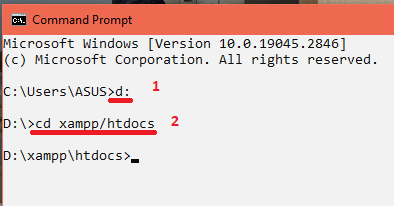
Setelah itu saya memanggil syntax cd xampp/htdocs yang bermaksud untuk masuk ke dalam directory path.
- Setelah membaca keterangan gambar di atas, silahkan untuk mengetikan syntax composer create-project codeigniter4/appstarter ci4_nama_kelas kemudian tekan Enter dan menunggu proses instalasi selesai. Perlu diperhatikan bahwa spasi maupun karakter simbol saat pengetikan kalimat syntax sangat berpengaruh terhadap hasil karena dapat berhasil maupun error, maka teliti-lah dalam mengetik syntax tersebut.
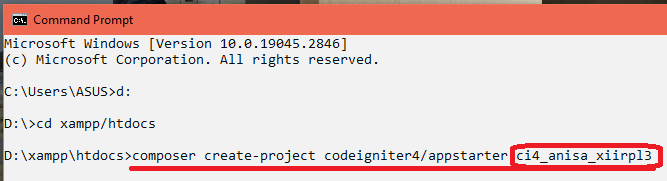

- Instalasi dikatakan selesai & berhasil jika saat proses menginstall tidak muncul keterangan berwarna merah ataupun memunculkan pesan Error.

- Setelah instalasi dinyatakan selesai, sama seperti versi Manual yang selanjutnya kita akan mecoba untuk me-running CodeIgniter4 menggunakan Web Browser.
Silahkan untuk membuka Web Browser seperti Google Chrome kemudian ketikan url berikut: localhost/ci4_nama_kelas kemudian tekan Enter, lalu klik folder public.
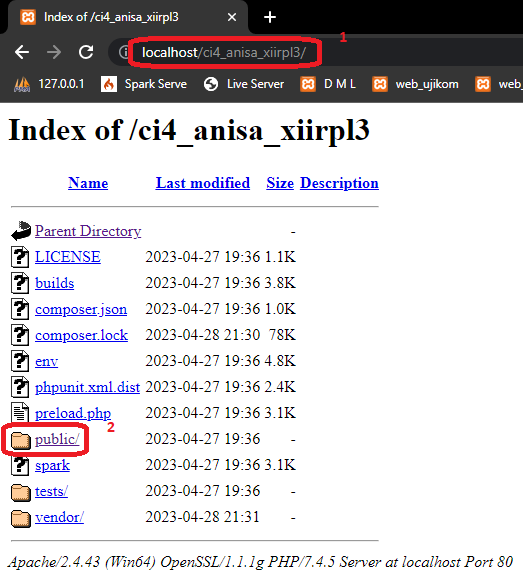
localhost/ci4_anisa_xiirpl3
- Setelah mengklik folder public, instalasi CodeIgniter4 versi bantuan menggunakan Composer yang sudah kita lakukan dikatakan sukses jika pada Web Browser muncul tampilan berikut:

localhost/ci4_anisa_xiirpl3/public
Sampai di sini sudah selesai, Bu?
Sebetulnya untuk proses intalasi CodeIgniter4 sampai di sini sudah selesai. Tetapi, untuk membangun sebuah Website pada umum-nya kita pasti memerlukan sebuah Setting maupun Konfigurasi dari beberapa file yang sudah disediakan oleh Framework CodeIgniter.
Proses Konfigurasi akan dibahas di pertemuan selanjutnya, atau klik di sini.

Pages: 1 2

Anisa Damayanti
a founder of december skies code, a software engineering teacher, and a lifelong learner who just tries her best at whatever she does. let's work together!


One Comment
David E. Smith
Dear Website Owner,
I hope this email finds you well. I recently discovered your website and was impressed by the quality of your content and the helpful information you offer to your audience. In light of this, I would like to propose a backlink exchange that could benefit both our websites.
My website, https://m.cheapestdigitalbooks.com/, is focused on providing affordable digital books to readers around the world. We currently have a strong online presence with a Domain Authority (DA) of 13, a Page Authority (PA) of 52, and a Domain Rating (DR) of 78. Our website features 252K backlinks, with 95% of them being dofollow, and has established connections with 5.3K linking websites, with 23% of these being dofollow links.
I believe that a mutually beneficial backlink exchange could be of great value for both of our websites, as it may lead to an increase in website authority and improve our search engine rankings. In this collaboration, I am willing to add backlinks from my website using your desired keywords and anchor texts. In return, I would be grateful if you could include backlinks with my desired keywords and anchor texts on your website.
I kindly request that you visit my website, https://m.cheapestdigitalbooks.com/, to get a sense of the potential benefits this partnership could bring to your site. I am confident that this collaboration will provide a win-win situation for both parties, and I look forward to learning more about your thoughts on this proposal.
Thank you for considering my offer. I am excited about the potential growth this partnership may bring to our websites and am eager to discuss the details further. Please do not hesitate to reach out to me at your convenience.
Best regards,
David E. Smith
Email: david@cheapestdigitalbooks.com
Address: 3367 Hood Avenue, San Diego, CA 92117